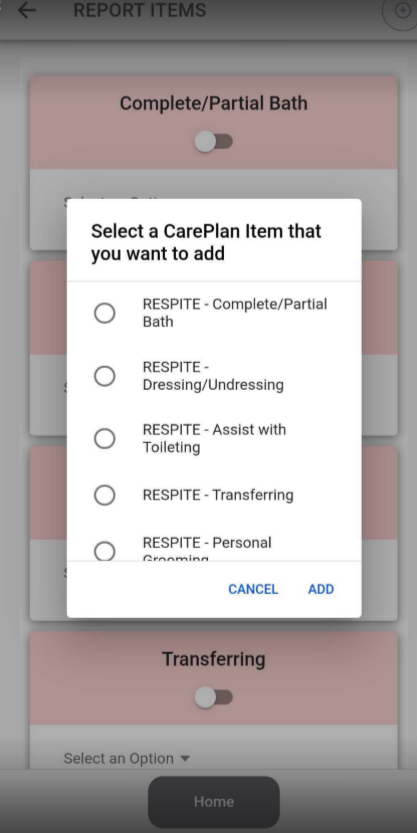
Add Care Plan Items
Add Care Plan Items as Needed
This feature gives the caregiver the option to "add-on" to the care plan, or by code to the visit. This is primarily for Private Pay and Virginia. In the mobile app, you will use the drop-down list to report any care plan items. For telephony, you will use a special code, click Virginia Respite Reporting for more. The process of reporting, for example for Respite, in the mobile app is effectively the same as with any visit type. The only difference is that you'll use the drop-down option to report the as-needed care plan items for Respite during departure. Note: If the task has already been selected and marked as complete/not needed, you will not be able to select it as an additional item. Please double check your tasks that are already completed before trying to add the same item twice.
Reporting Arrival - No Change
To clock in, click the Report Arrival button
Once you Report Arrival you will be asked to accept the time
You will then see a message confirming your arrival and telling you your expected departure time
Reporting Departure
To clock out, click on “visits” and then “Report Departure”
Once you Report Departure you will be asked to accept the time
You will then see a message confirming your arrival and telling you your expected departure time
Report care plan items as needed
If you are providing Respite services, report any additional care plan items by selecting the plus sign at the top right corner of the tasks page. Add the appropriate Respite care plan item(s) and mark as complete/not needed/refused.
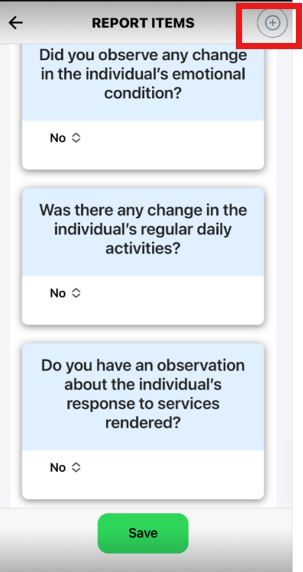
You can add as many items as you need to add
Collect signatures and report concerns if needed
You will then be asked if you are sure you want to report departure at this time. Click “submit” if you would like to continue with your clock out.
Once you see the success message you can navigate back to the home page